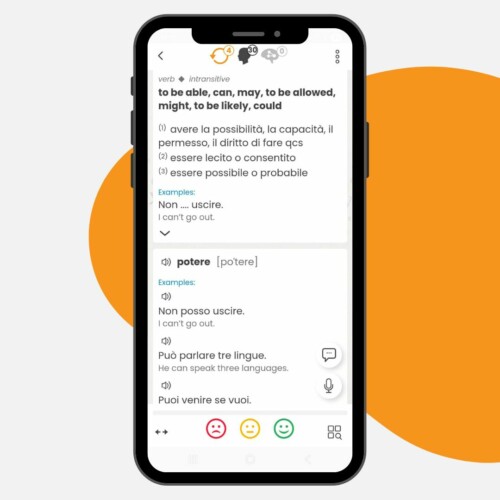
Learning vocabulary does not have to be slow or interrupted by clicking one icon after another. New changes have been introduced to PowerWords! courses in SuperMemo to simplify the whole process and let you focus on what matters most – understanding and remembering words in context. Now you can see more examples at the same time and hear their natural pronunciation without any extra actions.
It is a small change in the settings, but the effect is significant. Learning becomes smoother, more intuitive, and simply faster.
No more clicking – more content on the screen right away
One of the most common problems when learning vocabulary is losing focus. First the word. Then a click to see an example. Another click to hear the recording. And so on, over and over again.
The new settings in PowerWords! eliminate this problem.
After enabling the right options:
- you can see all example sentences right away,
- you hear the first example automatically,
- you do not lose your learning rhythm.
This changes the way you work with the material. Instead of “discovering” the content step by step, you process it as a whole.
How to enable the new options (a small step that makes a big difference)
The change is simple and available to every user.
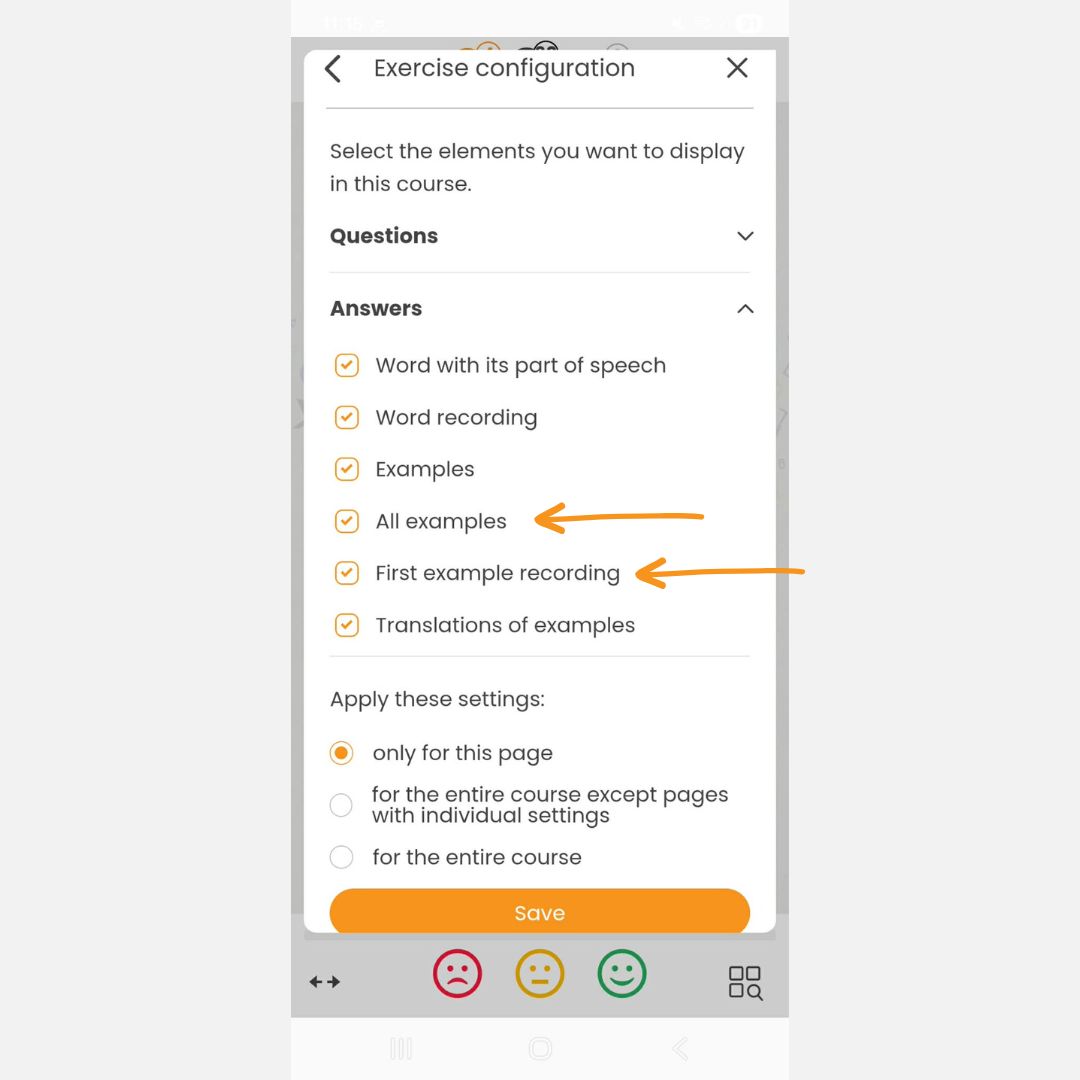
Just go to the exercise settings and select:
- All examples
- First example recording
Then apply the settings to the entire course. This is an important detail. Thanks to this, you do not have to change the configuration in each lesson separately. Once enabled, the options work throughout the course, helping you maintain consistency and learning pace.
Why does it work? Context instead of isolated words
Memorizing vocabulary is not about learning lists. Context is the key. It is what makes a word “come alive” and become truly useful.
The new settings support exactly this process:
- you see the word in several sentences at the same time,
- you grasp the meaning faster,
- you recognize usage patterns more easily,
- you reinforce natural sentence structures.
As a result, you are not just learning a translation. You are learning how a given word functions in the language.
Listening without effort – natural contact with the language
The second change concerns recordings. Automatically playing the first example may seem like a small detail. In practice, it makes a huge difference.
Why?
Because it removes the entry barrier. You do not have to decide whether to click. You simply hear it. And regular contact with pronunciation:
- improves listening comprehension,
- helps you get used to the accent,
- reinforces the rhythm of the language.
This is especially important at lower levels, where every contact with real language helps build strong foundations.
Smooth learning = better results
The biggest change is not the feature itself. It is the user experience.
When:
- you do not interrupt your learning,
- you do not switch between clicks,
- you do not lose focus,
your study sessions become shorter, but more cognitively intensive.
This translates into:
- better retention,
- less fatigue,
- greater consistency.
And it is consistency, supported by SuperMemo’s intelligent spaced repetition method, that determines effectiveness.
PowerWords! – more than a word list
PowerWords! courses have been designed from the very beginning as a tool for learning vocabulary in context. They include:
- definitions and translations,
- example sentences,
- usage information,
- different forms of a given word.
The new settings make even better use of this potential. Instead of clicking through the material, you start to absorb it as a coherent whole.
This changes your perspective. You move from learning individual elements to understanding the language as a system.
Check all available PowerWords! course languages.
Who are these changes for?
For anyone who:
- wants to speed up vocabulary learning,
- studies regularly and values their time,
- has trouble staying focused,
- wants to listen more and click less.
Summary: less clicking, more learning
The new options in PowerWords! do not change the course itself. They change the way you use it. They simplify the process, shorten reaction time, and allow you to focus on what really matters.
In practice, this means one thing: you learn faster, but without greater effort.
If you are not using these settings yet, it is worth turning them on and seeing the difference in your very first study session. Sometimes the smallest changes have the biggest impact on results.